Xelion has done its job well over the years. But many European businesses are starting to feel the strain. Pricing that chips away at margins. An outdated UI & a steep learning curve that doesn’t quite match a remote-first reality.
The shift is clear: modern teams want a scalable, flexible, brand-first solution built for remote growth. So, in this guide, we compare the top 5 Xelion softphone alternatives based on real user feedback, deployment speed, customization, and overall value.
1. Tragofone – Best European-Ready Softphone Alternative
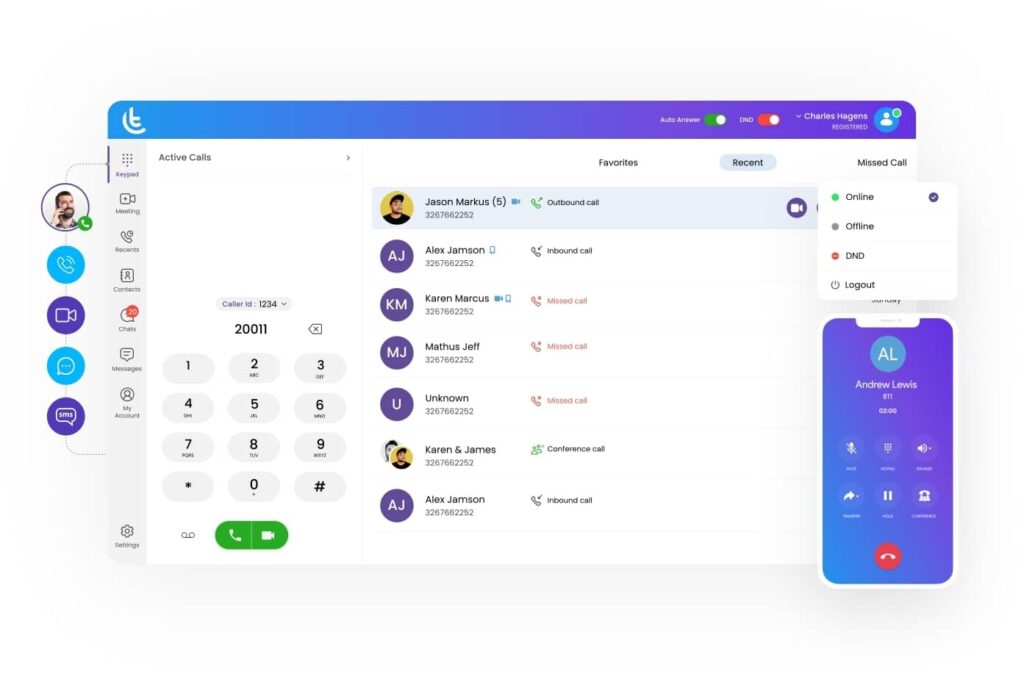
If you want flexibility without IT headaches, Tragofone is worth a serious look. It’s cloud-native, modular, and ready for European growth. No heavy configuration rituals. No locked feature tiers.
What Stands Out in Real-World Use
- Full rebranding: logo, colours, fonts, splash screen, app name, custom domain, publish your own branded apps on Google Play & App Store.
- Zero-touch bulk provisioning: Deploy 1,000+ softphones in minutes.
- PBX Flexibility: Works with 3CX, Asterisk, FreePBX, NetSapiens, and other SIP based PBXs. Plus, you can switch the backend without changing user apps.
- WebRTC + native apps + push notifications.
- European Deployments: Actively used by operators in France, the Netherlands, and Italy. It’s not just positioned for Europe, it’s operating there.
- Integrations: CRM integrations and Microsoft Teams connectivity are available, which helps reduce context-switching for sales and support teams.
- Core calling features: Call recording, BLF, presence, call barge, and multi-tenancy for resellers. The essentials are covered without needing multiple add-ons.
- Modular Pricing: You’re not forced into oversized bundles. That keeps margins predictable, especially for resellers.
|
Pros
|
Cons
|
|
High-quality voice/video even on weak internet
|
Not a full PBX (but pairs perfectly with any)
|
|
Full brand ownership for
MSPs
|
Limited public reviews due to white-label focus
|
|
Exceptional same-day support for issues
|
|
|
True multi-tenancy for resellers
|
|
Best For
In practice, Tragofone tends to make the most sense for
- MSPs expanding across Europe
- SMEs scaling teams
- Businesses replacing legacy PBX
Ready to see what a fully branded
softphone can do for your business?
Let’s build your communication future under your brand today. Explore our features and branding options to know if we’re a good fit for you.
2. 3CX – Flexible PBX Alternative with Strong Routing Control
3CX is an open source IP PBX with strong customization. Thus, it’s especially popular with IT-led teams that want more control over their phone system. It’s not the lightest platform in this list, but it’s quite configurable.
What Stands Out in Real-World Use
- Deployment flexibility: You can run it in the cloud or on-prem.
- Native multi-engine AI: With auto-summaries, sentiment, and action-item extraction.
- Advanced call routing: Queues, ring groups, IVR trees, time-based routing. It’s surely feature-packed.
- PBX-level control: Admins can adjust extensions, SIP trunks, routing rules, and system settings in depth.
- Massive EU partner network: Makes it easier to find local implementation partners, support providers, and certified specialists.
|
Pros
|
Cons
|
|
Strong routing and call management capabilities
|
Setup complexity
|
|
Mature ecosystem with broad documentation
|
White-label depth is limited
|
|
Flexible deployment options
|
Ongoing configuration may need IT involvement
|
|
|
Steep learning curve
|
Best For
In practice, 3CX works best for companies that want direct control over their telephony environment and have the technical resources to manage it. If you value customization and structured call handling over simplicity, it remains a dependable option.
- IT-led organizations
- Call centres with complex queue logic
- Companies migrating from traditional on-prem PBX
3. Zoom Phone – Best for Zoom-Centric Teams
If your team already spends half their day in Zoom meetings, Zoom Phone is a natural transition. It consolidates voice, video, and chat into one familiar interface. Although it’s designed for simplicity and familiarity rather than deep PBX engineering.
What Stands Out in Real-World Use
- Native Zoom experience: Calls, meetings, chat, and voicemail sit inside the same interface. There’s almost no learning curve if they’re already comfortable with Zoom.
- Built-in AI companion: Delivers full call transcripts, intelligent summaries, action items, and even suggested replies/
- Global coverage: International number availability and geographic flexibility make it practical for distributed teams.
- Decent call quality: Voice stability is generally solid, particularly on stable broadband. It performs predictably in standard business environments.
- Ecosystem Integration: Scheduling, Whiteboard, Team Chat, meetings, and voice are tightly connected. Moving from a call to a video meeting or sharing notes happens inside the same environment.
|
Pros
|
Cons
|
|
Quick rollout for existing Zoom users
|
Weak CRM/analytics
|
|
Strong AI companion
|
Limited white-label or branding flexibility
|
|
Clean admin interface
|
Routing depth isn’t as advanced as PBX-focused systems
|
|
Reliable performance for general business use
|
Advanced call centre features require higher tiers
|
Best For
In practice, Zoom Phone works best when you want communications wrapped into a single ecosystem. However, if you need heavy routing control or white-label capabilities, it may feel more limited.
- Companies already standardized on Zoom
- Businesses prioritizing ease of use over deep configuration
- Organizations expanding internationally with moderate call volume
4. Nextiva – All-in-One UCaaS for Structured Growth
Nextiva positions itself as more than just a phone system. It leans into unified communications, blending voice, messaging, video, and customer management features into one platform.
What Stands Out in Real-World Use
- Bundled communication suite: Voice, video meetings, SMS, and team collaboration are packaged together.
- Customer experience focus: Teams can view call history, engagement details, and basic CRM-style insights without needing separate systems.
- Reliable call quality: Voice performance is generally stable, especially in North American deployments.
- Analytics & reporting: Built-in dashboards provide visibility into call volume, agent performance, and response times. Useful for sales and support teams tracking KPIs.
- Tiered feature model: Capabilities increase with higher pricing tiers. This can be efficient for structured teams, but may feel restrictive if you only need specific features.
|
Pros
|
Cons
|
|
Built-in analytics and reporting
|
Features gated behind expensive plans, and tiered pricing can increase the total cost
|
|
Stable performance for SMB environments
|
Almost zero branding options
|
|
24/7 support
|
Stronger positioning in the US than in Europe
|
Best For
In practice, Nextiva works well when you want a consolidated communications platform with analytics baked in. It’s less about deep customization and more about structured, predictable deployment.
- US-headquartered companies with EU operations
- Sales and support teams that need analytics visibility
5. Google Voice – Simple, Familiar, and Built for Google-First Teams
Google Voice is straightforward by design. It’s not trying to be a full PBX or a reseller platform. It’s a lightweight business calling solution that fits neatly inside the Google ecosystem.
If your team already runs on Gmail, Google Calendar, and Google Meet, Voice feels like a natural extension.
What Stands Out in Real-World Use
- Tight Google Workspace integration: Place calls from your browser, manage voicemail from your inbox, and keep everything inside the same login environment.
- Quick Setup: Admins can assign numbers and users without complex routing logic or infrastructure planning.
- Browser-first experience: Web-based calling is reliable, and the mobile apps are easy to use. There’s no heavy desktop client to manage.
- Affordable entry point: For small teams, pricing is more accessible than enterprise-focused platforms.
- Tiered feature model: Capabilities increase with higher pricing tiers. This can be efficient for structured teams, but may feel restrictive if you only need specific features.
|
Pros
|
Cons
|
|
Extremely easy to deploy
|
Limited advanced call routing
|
|
Clean, familiar interface
|
Minimal white-label or branding options
|
|
Strong Google Workspace integration
|
Basic analytics compared to enterprise VoIP platforms
|
|
Predictable pricing for small teams
|
Not built for high-volume call centres
|
Best For
In practice, Google Voice works best when simplicity is the goal; it does exactly what it promises without adding complexity. If you need advanced routing, deep integrations beyond Google, or reseller flexibility, it may feel too minimal.
- Small teams and startups
- Businesses that already fully embedded in Google Workspace
- Companies needing simple business numbers without PBX complexity
- Organizations with light to moderate call volume
Choosing the Right Xelion Alternative in 2026: Match the Tool to the Strategy
Xelion has served many businesses well. But as communication stacks evolve, expectations shift, and the need for an alternative VoIP stack arises. Now, there isn’t a universal best alternative. There’s only the best fit for your model.
|
If you want
|
Consider
|
Softphone Alternative
|
|
Brand ownership and reseller scalability
|
White-label-ready platform
|
Tragofone
|
|
Granular PBX control
|
Highly configurable PBX-style system
|
3CX
|
|
Scaling across Europe
|
EU-ready infrastructure with modular pricing
|
Tragofone, 3CX
|
|
Bundled UC suite
|
All-in-one communications platform
|
Nextiva
|
|
Small, simple team setup
|
Lightweight, easy deployment
|
Google Voice
|
|
Already Zoom-based
|
Native ecosystem alignment
|
Zoom Phone
|
Here, the key is alignment. Align the platform with your margins, growth speed or goals, and how your teams actually work.
Switching VoIP providers is not just a feature comparison exercise. It’s a strategic infrastructure decision. Pricing transparency, white-label control, AI capabilities, omnichannel messaging, integration depth, and real total cost of ownership should be your decision drivers.
Choose the one that supports where your business is heading, not just where it has been. Remember, the platform you pick today shapes tomorrow’s margins.
FAQs About Xelion Alternatives
What is the best Xelion alternative in Europe?
The real answer: the best alternative is the one aligned with your growth model, not just your feature checklist.
Tragofone’s white-label control and its easy-to-set-up and use softphone are a strong fit, but the PBX performance depends on the VoIP provider chosen. And while 3CX solves that problem, the steep learning curve and TOC are some considerations.
So, we’ve laid down the facts; you pick your field of roses and thorns accordingly.
Can I port my number from Xelion?
Yes, in most cases. Number porting is standard practice across reputable VoIP providers. Notably, port timelines vary by country, but most European transfers complete within 5–20 business days.
Which Alternative Is Best for Remote Teams?
Remote teams typically prioritize stable WebRTC calling, reliable mobile push notifications, CRM pop-ups and integrations, and video & messaging inside one environment.
Platforms that are cloud-native and browser-ready tend to perform better in distributed environments. If your team works across countries and devices daily, prioritize softphone stability over on-prem flexibility.
What VoIP trends in 2026 are making legacy systems struggle?
Several shifts in 2026 are exposing the limitations of older VoIP systems, especially those built around static office environments or rigid licensing models.
The biggest pressure points include AI-powered call intelligence, omnichannel communication, WebRTC calling, API-first architecture, White-labelling, EU compliance, and scalable auto-provisioning.
What is the Total Cost of Ownership (TCO) when switching from Xelion?
Total Cost of Ownership goes beyond the monthly license fee. It includes every direct and indirect cost tied to running your VoIP system.
When comparing Xelion alternatives, evaluate:
- Base per-user subscription pricing
- Add-ons for call recording, analytics, and AI features
- International calling rates
- Integration costs (CRM, Microsoft Teams, helpdesk tools)
- Admin and IT management time
- Hardware requirements (desk phones vs softphone-only)
- Migration or onboarding support fees
A lower advertised price does not always mean lower long-term cost. Hidden add-ons and operational overhead often widen the gap over time.
How to Migrate from Xelion Without the Headache?
Here’s a simplified migration roadmap:
- Audit your current setup: Extensions, IVRs, call queues, integrations.
- Map your routing logic: Replicate before decommissioning.
- Confirm number portability: Validate ownership and contract terms.
- Run a pilot group: Move a small team first.
- Schedule cutover during low traffic hours: Avoid peak call periods.
- Provide quick user training: Even small UI differences can cause friction.