Key Takeaways
- Most providers measure the platform, not the app: Yet the softphone is the only part of the service most end users ever see.
- Five categories cover what matters: Experience, reliability, adoption, support and business impact.
- Ratings deserve a hard threshold: App store conversion drops sharply below four stars, and partners notice long before you do.
- A KPI only works with an owner and a trigger: X2Com’s minimum 8+ rating policy turned app quality into a business rule, and that rule is what prompted action.
Most service providers can tell you their platform uptime to two decimal places. Far fewer can tell you their softphone’s app store rating, how many provisioned users actually use it, or what share of support tickets it generates.
That gap is expensive. The softphone is the part of your service end users touch every day, so when it slips, partners and customers feel it first, and you hear about it last.
This guide sets out the softphone KPIs worth tracking, how to measure each one, the benchmarks that exist, and how to turn the numbers into decisions. It draws on how Tragofone customers such as X2Com used a ratings threshold to protect its reputation.
Why Softphone KPIs Matter for Service Providers
Platform metrics tell you whether your network is healthy. They don’t tell you whether your users are having a good experience, and that experience is what drives renewals.
Three things make the softphone worth measuring on its own:
- It carries your brand. With a white-label app, every missed call and confusing update is attributed to you, not your vendor.
- Its failures are quiet. Users rarely complain formally. They forward calls to personal phones, stop using the app, and eventually leave.
- It affects revenue beyond support. Call problems cost deals: 60% of salespeople report losing a deal because of call-related issues, according to research from Hiya.
X2Com, a telecom provider serving SMEs across the Netherlands and Belgium, shows what measurement makes possible. Its internal policy requires a minimum 8+ rating for every product it offers. When its previous softphone’s ratings began to fall, the policy turned scattered complaints into a clear case for change.
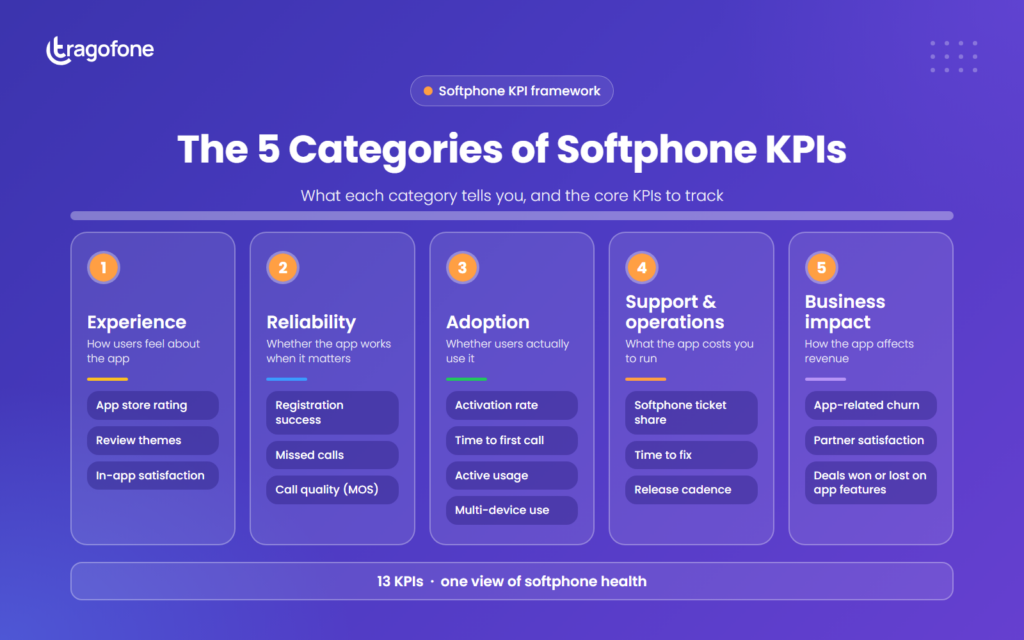
The 5 Categories of Softphone KPIs
| Category | What it tells you | Core KPIs |
|---|
| Experience | How users feel about the app | App store rating, review themes, in-app satisfaction |
| Reliability | Whether the app works when it matters | Registration success, missed calls, call quality (MOS) |
| Adoption | Whether users actually use it | Activation rate, time to first call, active usage, multi-device use |
| Support and operations | What the app costs you to run | Softphone ticket share, time to fix, vendor release cadence |
| Business impact | How the app affects revenue | App-related churn, partner satisfaction, deals won or lost on app features |
Experience KPIs: How Users Feel About Your App
Experience KPIs are your earliest warning system. They move before tickets pile up and long before customers churn.
1. App Store Rating
Your average rating in the Apple App Store and Google Play is the most public measure of your softphone, and prospects see it before they ever speak to sales.
The threshold that matters is four stars. NP Digital’s analysis of download data from 49 companies found that apps rated four stars convert at 0.83 of a five-star app’s rate, falling to 0.57 at three stars. Alchemer (formerly Apptentive) reports that moving from three to four stars can lift conversion by 89%.
Track your rating weekly on both stores, and set a floor that triggers a formal review when crossed.
Example: X2Com set that floor at 8+ for every product it offers. When its previous softphone slipped toward the line, the policy forced action. After moving to a customized Tragofone app, its ratings stabilized above the 8+ benchmark.
2. Review Themes
A rating tells you that something is wrong. Reviews tell you what. Grouping reviews into recurring themes, such as “missed calls”, “battery drain” or “confusing setup”, turns anecdotes into a prioritized fix list.
Tag every review by theme each month, and track the share of reviews that mention your top three issues.
3. In-App Satisfaction
App store reviews come mostly from users who are delighted or frustrated. A short in-app survey after a call, or a quarterly satisfaction score, captures the silent majority in between. Call-level signals can help too: an AI softphone with sentiment insights adds a view of how conversations themselves are going.
Ask one question after a sample of calls, such as “How was your call quality?”, and track the score by platform and app version.
Reliability KPIs: Whether the App Works When It Matters
Reliability is the foundation every other KPI rests on. A beautifully designed app that misses calls will never earn a good rating.
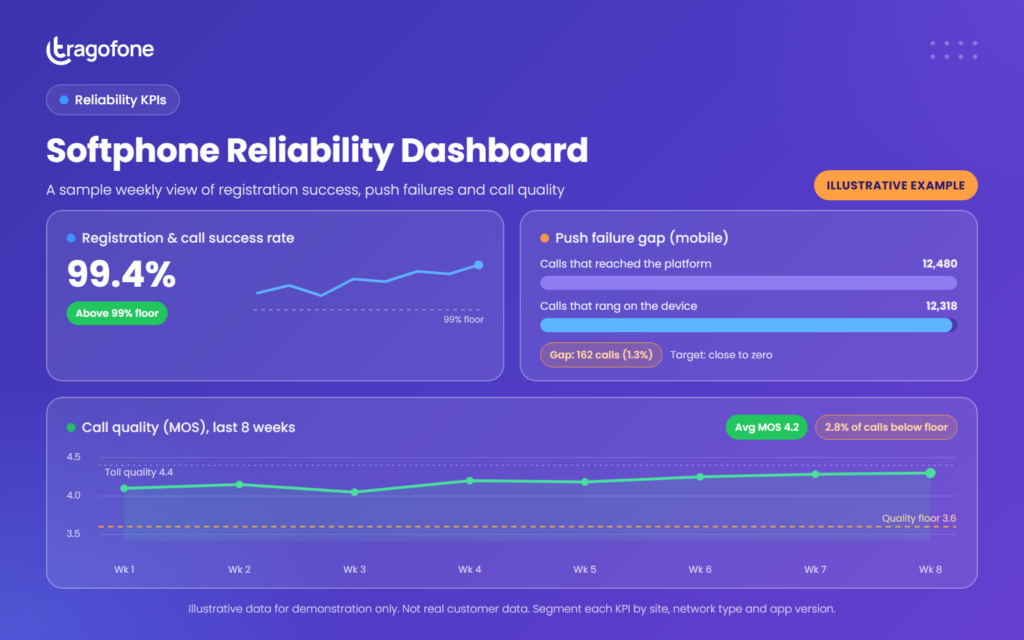
4. Registration and Call Success Rate
This measures the share of registration attempts and call setups that succeed. Failures show up to users as “not registered” errors, calls that won’t connect, or an app that needs restarting.
Pull registration and call setup outcomes from your platform logs, and break failures down by app version, device and network type.
5. Missed Calls Caused by Notification Failures
On mobile, a call only rings if the push notification arrives in time. When it doesn’t, the caller hears ringing while the user’s phone stays silent. These are the most damaging failures because users rarely realize they happened.
Compare calls that reached the platform against calls that rang on the device. The gap is your push failure rate. Reliable VoIP push notifications are what keep that gap close to zero.
6. Call Quality (MOS)
Mean Opinion Score (MOS) rates perceived voice quality on a scale of 1 to 5. Most platforms estimate it from network conditions using the ITU-T G.107 E-model, and a MOS of 4.4 to 4.5 is considered equivalent to a toll-quality PSTN call.
MOS depends heavily on the network, so track it alongside latency, jitter and packet loss to separate app problems from network problems.
Report average MOS and the share of calls below your quality floor, segmented by site, network type and app version.
Example: Instability was the first problem OIT, a Miami-based UCaaS provider, cited with its previous softphone. Moving to Tragofone gave it a stable integration with its NetSapiens platform.
Can’t See How Your Softphone Is Performing?
The right softphone makes its own performance visible.
Tragofone gives service providers a fully branded softphone for desktop and mobile, with built-in debugging logs and connection tests, regular releases and responsive support, so problems surface before your customers find them.
Adoption KPIs: Whether Users Actually Use It
A provisioned seat is not an active user. Adoption KPIs reveal the gap between what you sold and what customers use, which is exactly where churn begins.
7. Activation Rate and Time to First Call
Activation rate is the share of provisioned users who complete a first call. Time to first call measures how long that takes from account creation. Both expose onboarding friction that never shows up in a ticket.
Measure both for every new customer, and compare manual setups against those using auto-provisioning or sign-in with existing credentials.
Example: For Kalaam Telecom, Tragofone delivered contact sync and user provisioning from a web portal, so users could start calling without manual configuration.
8. Active Usage Ratio
This compares users who make or receive calls through the app in a given week against the total number of provisioned seats. A falling ratio means users are routing around your app, usually to personal mobiles.
Track weekly active users as a percentage of provisioned seats for each customer, and flag accounts that drop sharply quarter on quarter.
9. Multi-Device Usage
This measures the share of users active on both desktop and mobile. Users who rely on the app across devices are far more embedded in your service than those who use it occasionally on one.
Segment active users by device type, and track how many use more than one. Offering a desktop softphone alongside mobile is the precondition for moving this number.
Example: OIT’s previous softphone was mobile-only. After moving to Tragofone, its users run one account across desktop and mobile with no extra configuration, and the low-effort rollout led to rapid adoption.
Support and Operations KPIs: What the App Costs You to Run
Every softphone problem eventually lands on your help desk. These KPIs put a number on that cost, and on how quickly your vendor helps you reduce it.
10. Softphone Ticket Share
This is the share of all support tickets that relate to the softphone. It is the single best indicator of whether your app is reducing work or creating it. A rising share is one of the clearest signs it’s time to replace your white-label softphone.
Tag tickets by component, and review the softphone share monthly alongside its top three causes.
11. Time to Fix and Release Cadence
Time to fix measures how long a reported softphone bug takes to reach users as a released update. Release cadence tracks how often your vendor ships updates at all. Together, they show whether problems get solved or simply logged.
Record report and release dates for every critical issue, and confirm who controls app store publishing. With true white-labeling, the app is published under your account, so fixes reach users on your timeline.
Example: X2Com’s previous app drew repeated complaints about functionality gaps from partners and end users. Its deciding factor in choosing Tragofone was a vendor willing to build what its partners needed, including seven targeted customizations.
Business Impact KPIs: How the App Affects Revenue
These are the KPIs leadership cares about. They connect softphone quality to the numbers that decide budgets.
12. App-Related Churn and Partner Satisfaction
Track how many lost customers cite the app as a factor, and survey partners regularly on how the app affects their own customer relationships. For providers that sell through partners, the second number often moves first.
Add an app-specific question to exit surveys and quarterly partner reviews.
13. Deals Won or Lost on App Features
Capture whether softphone features came up in won and lost deals. Losses on features rarely appear in support data, so this is the only way to see what a weak app costs your sales team. Our roundup of VoIP industry statistics shows how often call experience shapes buying decisions.
Add a “softphone features” field to your CRM’s win and loss reasons, and review it each quarter.
Softphone KPI Scorecard: How Mature Is Your Measurement?
Tick each KPI you track today with a named owner and a regular review. Your total shows where your measurement stands.
☐ App store rating
☐ Review themes
☐ In-app satisfaction
☐ Registration and call success rate
☐ Missed calls caused by notification failures
☐ Call quality (MOS)
☐ Activation rate and time to first call
☐ Active usage ratio
☐ Multi-device usage
☐ Softphone ticket share
☐ Time to fix and release cadence
☐ App-related churn and partner satisfaction
☐ Deals won or lost on app features
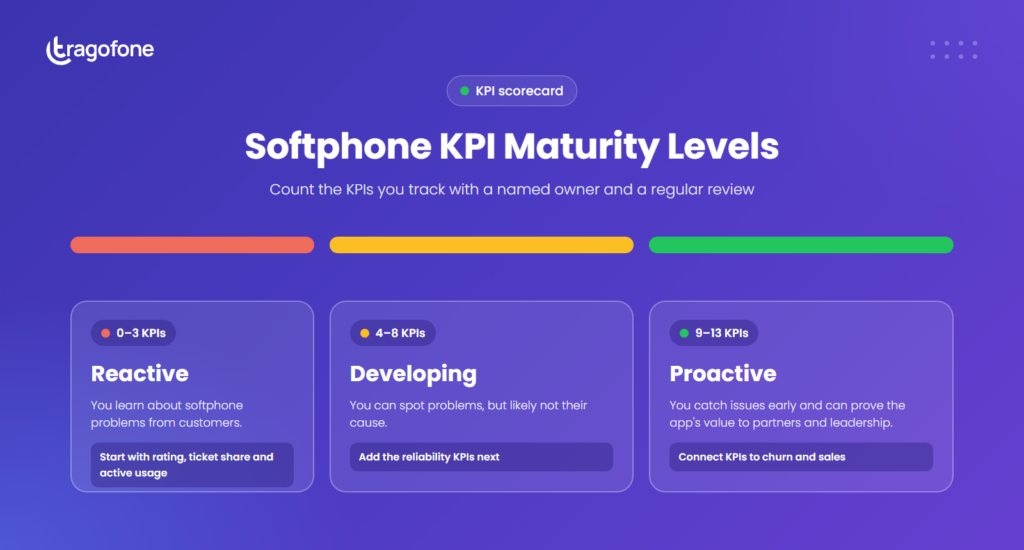
| KPIs tracked | Maturity level | What it means |
|---|
| 0–3 | Reactive | You learn about softphone problems from customers. Start with rating, ticket share and active usage. |
| 4–8 | Developing | You can spot problems, but likely not their cause. Add the reliability KPIs. |
| 9–13 | Proactive | You can catch issues early and prove the app’s value to partners and leadership. |
How to Build a Softphone KPI Program in 5 Steps
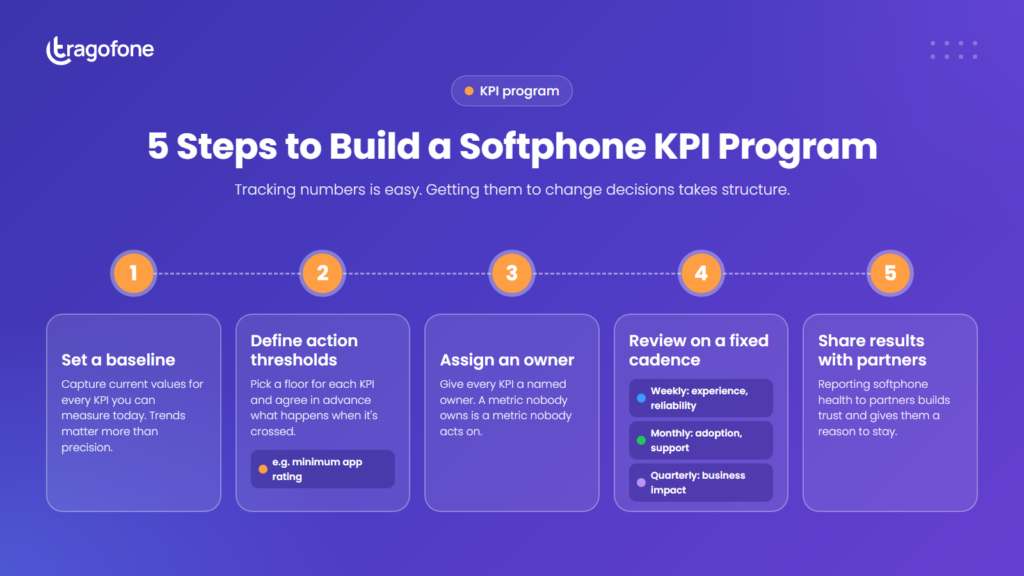
Tracking numbers is easy. Getting them to change decisions takes structure.
1. Set a baseline. Capture current values for every KPI you can measure today, even imperfectly. Trends matter more than precision.
2. Define thresholds that trigger action. Pick a floor for each KPI, such as a minimum app store rating, and agree in advance what happens when it’s crossed.
3. Assign an owner to each KPI. A metric nobody owns is a metric nobody acts on.
4. Review on a fixed cadence. Experience and reliability KPIs work best weekly, adoption and support monthly, and business impact quarterly.
5. Share the results with partners. Reporting softphone health to partners builds trust and gives them a reason to stay.
Your vendor should make this easier, not harder. Analytics and monitoring are among the capabilities we recommend scoring when evaluating a softphone for large deployments.
Example: X2Com’s program had exactly this shape: a clear threshold (an 8+ rating), applied to every product, with action required when a product fell short. That rule is what moved the softphone from a recurring complaint to a replacement project.
What to Do When a Softphone KPI Slips
When a number moves the wrong way, start with the most likely cause before assuming the app is at fault.
| KPI slipping | Most likely cause | First move |
|---|
| App store rating | A recent release, or a recurring unresolved issue | Read the last 30 days of reviews and match them to release dates |
| Registration success | Network, NAT or SBC changes, or an OS update | Check whether failures cluster by network, device or app version |
| Missed calls on mobile | Push notification delivery problems | Compare platform call logs with device ring events |
| Call quality (MOS) | Network jitter, latency or packet loss | Rule out the network first; our guide to improving VoIP call quality covers the usual fixes |
| Activation rate | Manual or confusing onboarding | Time a new user’s path from account creation to first call |
| Active usage | Users routing calls to personal phones | Interview a sample of inactive users at affected accounts |
| Softphone ticket share | Reliability or usability problems | Rank the top three ticket causes and escalate them with your vendor |
If several KPIs slip together and stay down after network causes are ruled out, the app itself is the likely problem.
Softphone KPIs Turn App Quality Into a Business Decision
Without measurement, softphone quality is a matter of opinion: a partner’s complaint here, a support lead’s hunch there. With the right KPIs, it becomes a number with a threshold, an owner and a consequence.
“You can’t protect what you don’t measure. The providers who track their softphone catch problems while they’re still fixable.”
Start small: app store rating, softphone ticket share and active usage give you a working picture within a month. Add the reliability KPIs next, then connect everything to churn and sales. See how other providers improved their numbers on our case studies page.
See how a softphone built for service providers performs on every one of these KPIs.
FAQs About Softphone KPIs
What are softphone KPIs?
Softphone KPIs are the metrics service providers use to measure how well their calling app performs for users and the business. They cover five areas: experience, reliability, adoption, support and operations, and business impact.
Which softphone KPIs should a service provider track first?
Start with app store rating, softphone ticket share and active usage ratio. Together, they show how users feel, what the app costs you to support, and whether people actually use it.
What is a good app store rating for a softphone?
Aim to stay above four stars. Download conversion drops sharply below that threshold, and a falling rating is often the first public sign of a problem.
What is a good MOS score for VoIP calls?
MOS runs from 1 to 5, and a score of 4.4 to 4.5 is considered equivalent to a toll-quality PSTN call. Because MOS depends heavily on network conditions, track it alongside latency, jitter and packet loss.
How do I measure softphone adoption?
Track activation rate (provisioned users who complete a first call), time to first call, the active usage ratio (weekly active users divided by provisioned seats), and the share of users active on more than one device.
How often should softphone KPIs be reviewed?
Review experience and reliability KPIs weekly, adoption and support KPIs monthly, and business impact KPIs quarterly.
How do softphone KPIs help when choosing a new vendor?
Your baseline shows exactly where the current app falls short. You can then ask vendors how they would improve each weak KPI, and measure the new app against the same numbers after rollout.